
- May 15, 2024
Solving a Conditional Sum Text Problem
Sign up to hear about free Excel training.
I won't share your email with anyone.
The image below has an example of the problem.
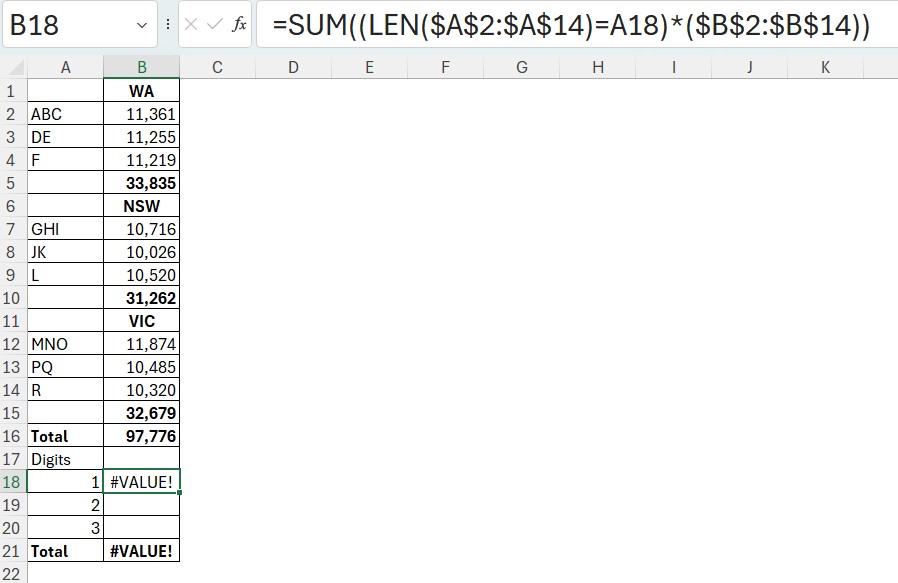
I want to add up the values in column B based on the length of the codes in column A.
I am using a SUM function with a condition based on the LEN function. This is a dynamic array solution. You can use SUMPRODUCT in place of SUM in older versions.
The formula returns an error because the text headings in column B are being multiplied. You cannot multiply text.
To get around that problem we can add two characters. The N function and the + plus sign.
We need the N function to convert the text in column B to zeroes. I have covered this is a previous post.
https://www.excelyourself.com.au/blog/excel-n-function
The + plus sign gets the range to work properly with the N function. I have written about this in the post below.
https://a4accounting.com.au/forcing-a-spill-with-the-magic-plus-sign/
The image below has the final formula.
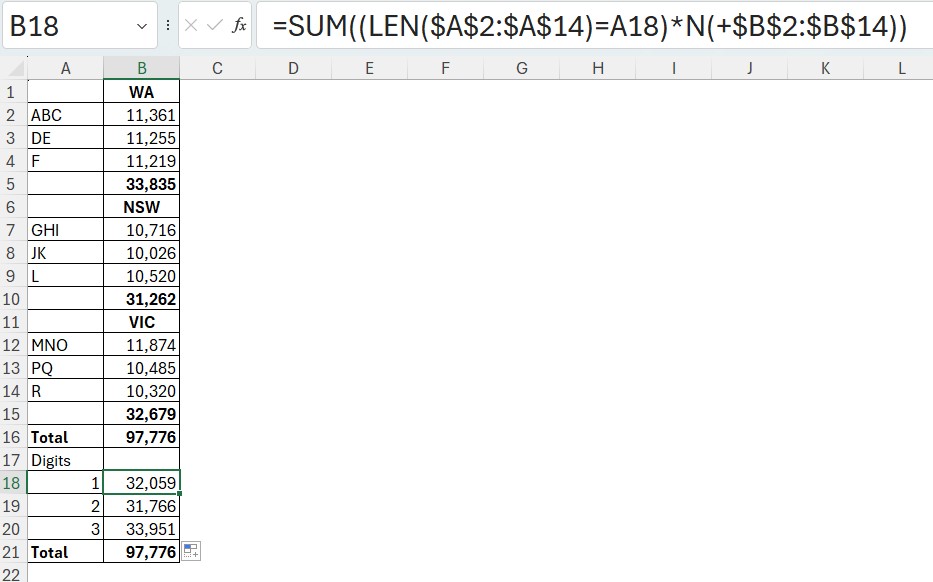
The formula is.
=SUM((LEN($A$2:$A$14)=A18)*N(+$B$2:$B$14))The N function offers many solutions when text is a problem.